






新闻中心 
【情人节特辑】:虚拟女友教你如何正确“回答”
 2025-07-16
 浏览次数:次
 返回列表
返回列表该项目旨在通过技术手段将“直男话术”转化为高情商表达,以增进情侣感情。其核心是让虚拟女友纠正不当话语,具体步骤如下:首先,输入直男语句(如“多喝热水”)转换为对应编号的高情商表达;接着用Pixel2Pixel模型将卡通照片真人化;再将真人化照片输入PaddleBoBo生成女友动画;最后让虚拟女友纠正话语。项目需32GB以上显卡环境,依赖相关模型和工具实现。
☞☞☞AI 智能聊天, 问答助手, AI 智能搜索, 免费无限量使用 DeepSeek R1 模型☜☜☜
虚拟女友纠正话语器
情侣之间相处少不了摩擦,但是据发现很多不必要的吵架,往往是词不达意造成的。比如关心她的身体健康,要注意身体,往往就只说了句“多喝热水”。如果换成另外一种表达,会让对方更容易接受,也更容易接收你给的爱意。因此“会说话”就变得十分重要了。这个项目就给大家一个初步的示范,怎么样的高情商的回答会让这段感情升温。
主要内容借鉴了我之前的项目:打造一个专属自己的卡通真人化主播
例如输入这张照片以及直男话术,你觉得会呈现出什么效果的视频呢?(doge)
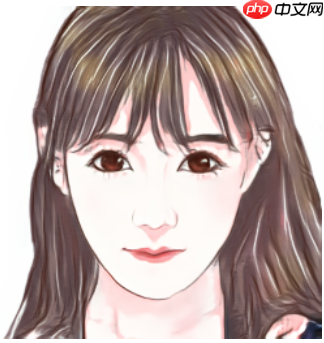
直男语句:多喝热水。
效果展示
整体实现:
1.输入直男话语切换成高情商语句
2.利用Pixel2Pixel模型实现卡通照片真人化
3.把真人化输出的照片输入进PaddleBoBo生成女友动画
4.让虚拟女友纠正你的话语
PS:执行此项目请使用32GB显卡以上环境(看PaddleBoBo作者项目有提到,用16GB会爆内存导致跑不通,且本次项目也是在32GB显卡环境上制作的)
第一步、输入直男话语切换成高情商语句
请记住生成的编号等等用得着
 美图云修
美图云修
商业级AI影像处理工具
 50
查看详情
50
查看详情
 In [ ]
huashu_dict={'多喝热水':'a', '你怎么又生气了':'b', '你又怎么了':'c', '你要这样想我也没办法':'d', '随便你!你定吧':'e', '哦':'f'}#请输入上面指定语句(粗糙版,请大家多多包涵)a = input('请输入直男语句:'+'\n')if a in huashu_dict: print('已生成合适的话术'+'\n'+'请记住生成编号'+':'+huashu_dict.get(a))else: print('不好意思,这句话我还没学会呢。')请输入直男语句: 已生成合适的话术 请记住生成编号:a
第二步、利用Pixel2Pixel模型实现卡通照片真人化
主要是修改 image_name='01503.png',改成自己心仪的动漫照片(最好使用逆向思维:卡通照片真人化项目里面数据集的照片文件,其他动漫照片生成效果不好看,我不负责的哈)
In [ ]import paddleimport paddle.nn as nnfrom paddle.io import Dataset, DataLoaderimport osimport cv2import numpy as npfrom tqdm import tqdmimport matplotlib.pyplot as pltimport PIL.Image as Image
%matplotlib inlineclass UnetGenerator(nn.Layer):
def __init__(self, input_nc=3, output_nc=3, ngf=64):
super(UnetGenerator, self).__init__()
self.down1 = nn.Conv2D(input_nc, ngf, kernel_size=4, stride=2, padding=1)
self.down2 = Downsample(ngf, ngf*2)
self.down3 = Downsample(ngf*2, ngf*4)
self.down4 = Downsample(ngf*4, ngf*8)
self.down5 = Downsample(ngf*8, ngf*8)
self.down6 = Downsample(ngf*8, ngf*8)
self.down7 = Downsample(ngf*8, ngf*8)
self.center = Downsample(ngf*8, ngf*8)
self.up7 = Upsample(ngf*8, ngf*8, use_dropout=True)
self.up6 = Upsample(ngf*8*2, ngf*8, use_dropout=True)
self.up5 = Upsample(ngf*8*2, ngf*8, use_dropout=True)
self.up4 = Upsample(ngf*8*2, ngf*8)
self.up3 = Upsample(ngf*8*2, ngf*4)
self.up2 = Upsample(ngf*4*2, ngf*2)
self.up1 = Upsample(ngf*2*2, ngf)
self.output_block = nn.Sequential(
nn.ReLU(),
nn.Conv2DTranspose(ngf*2, output_nc, kernel_size=4, stride=2, padding=1),
nn.Tanh()
) def forward(self, x):
d1 = self.down1(x)
d2 = self.down2(d1)
d3 = self.down3(d2)
d4 = self.down4(d3)
d5 = self.down5(d4)
d6 = self.down6(d5)
d7 = self.down7(d6)
c = self.center(d7)
x = self.up7(c, d7)
x = self.up6(x, d6)
x = self.up5(x, d5)
x = self.up4(x, d4)
x = self.up3(x, d3)
x = self.up2(x, d2)
x = self.up1(x, d1)
x = self.output_block(x) return xclass Downsample(nn.Layer):
# LeakyReLU => conv => batch norm
def __init__(self, in_dim, out_dim, kernel_size=4, stride=2, padding=1):
super(Downsample, self).__init__()
self.layers = nn.Sequential(
nn.LeakyReLU(0.2),
nn.Conv2D(in_dim, out_dim, kernel_size, stride, padding, bias_attr=False),
nn.BatchNorm2D(out_dim)
) def forward(self, x):
x = self.layers(x) return xclass Upsample(nn.Layer):
# ReLU => deconv => batch n orm => dropout
def __init__(self, in_dim, out_dim, kernel_size=4, stride=2, padding=1, use_dropout=False):
super(Upsample, self).__init__()
sequence = [
nn.ReLU(),
nn.Conv2DTranspose(in_dim, out_dim, kernel_size, stride, padding, bias_attr=False),
nn.BatchNorm2D(out_dim)
] if use_dropout:
sequence.append(nn.Dropout(p=0.5))
self.layers = nn.Sequential(*sequence) def forward(self, x, skip):
x = self.layers(x)
x = paddle.concat([x, skip], axis=1) return x#实例化生成器generator = UnetGenerator()#加载权重last_weights_path = 'data/data148534/epoch100.pdparams'print('加载权重:', last_weights_path)
model_state_dict = paddle.load(last_weights_path)
generator.load_dict(model_state_dict)
generator.eval()#读取数据image_name='01503.png'img_A2B = cv2.imread('work/'+image_name)
img_A = img_A2B[:, 256:] # 卡通图(即输入)img_B = img_A2B[:, :256] # 真人图(即预测结果)g_input = img_A.astype('float32') / 127.5 - 1 # 归一化g_input = g_input[np.newaxis, ...].transpose(0, 3, 1, 2) # NHWC -> NCHWg_input = paddle.to_tensor(g_input) # numpy -> tensorg_output = generator(g_input)
g_output = g_output.detach().numpy() # tensor -> numpyg_output = g_output.transpose(0, 2, 3, 1)[0] # NCHW -> NHWCg_output = g_output * 127.5 + 127.5 # 反归一化g_output = g_output.astype(np.uint8)#只保存生成真人图像img = np.asarray(g_output).copy()
img = Image.fromarray(cv2.cvtColor(img,cv2.COLOR_BGR2RGB))# cv2 to Imageimg.s*e('work/'+'output_'+image_name)
img_show = np.hstack([img_A, g_output])[:,:,::-1]
plt.figure(figsize=(8, 8))
plt.imshow(img_show)
plt.show()
orm => dropout
def __init__(self, in_dim, out_dim, kernel_size=4, stride=2, padding=1, use_dropout=False):
super(Upsample, self).__init__()
sequence = [
nn.ReLU(),
nn.Conv2DTranspose(in_dim, out_dim, kernel_size, stride, padding, bias_attr=False),
nn.BatchNorm2D(out_dim)
] if use_dropout:
sequence.append(nn.Dropout(p=0.5))
self.layers = nn.Sequential(*sequence) def forward(self, x, skip):
x = self.layers(x)
x = paddle.concat([x, skip], axis=1) return x#实例化生成器generator = UnetGenerator()#加载权重last_weights_path = 'data/data148534/epoch100.pdparams'print('加载权重:', last_weights_path)
model_state_dict = paddle.load(last_weights_path)
generator.load_dict(model_state_dict)
generator.eval()#读取数据image_name='01503.png'img_A2B = cv2.imread('work/'+image_name)
img_A = img_A2B[:, 256:] # 卡通图(即输入)img_B = img_A2B[:, :256] # 真人图(即预测结果)g_input = img_A.astype('float32') / 127.5 - 1 # 归一化g_input = g_input[np.newaxis, ...].transpose(0, 3, 1, 2) # NHWC -> NCHWg_input = paddle.to_tensor(g_input) # numpy -> tensorg_output = generator(g_input)
g_output = g_output.detach().numpy() # tensor -> numpyg_output = g_output.transpose(0, 2, 3, 1)[0] # NCHW -> NHWCg_output = g_output * 127.5 + 127.5 # 反归一化g_output = g_output.astype(np.uint8)#只保存生成真人图像img = np.asarray(g_output).copy()
img = Image.fromarray(cv2.cvtColor(img,cv2.COLOR_BGR2RGB))# cv2 to Imageimg.s*e('work/'+'output_'+image_name)
img_show = np.hstack([img_A, g_output])[:,:,::-1]
plt.figure(figsize=(8, 8))
plt.imshow(img_show)
plt.show() orm => dropout
def __init__(self, in_dim, out_dim, kernel_size=4, stride=2, padding=1, use_dropout=False):
super(Upsample, self).__init__()
sequence = [
nn.ReLU(),
nn.Conv2DTranspose(in_dim, out_dim, kernel_size, stride, padding, bias_attr=False),
nn.BatchNorm2D(out_dim)
] if use_dropout:
sequence.append(nn.Dropout(p=0.5))
self.layers = nn.Sequential(*sequence) def forward(self, x, skip):
x = self.layers(x)
x = paddle.concat([x, skip], axis=1) return x#实例化生成器generator = UnetGenerator()#加载权重last_weights_path = 'data/data148534/epoch100.pdparams'print('加载权重:', last_weights_path)
model_state_dict = paddle.load(last_weights_path)
generator.load_dict(model_state_dict)
generator.eval()#读取数据image_name='01503.png'img_A2B = cv2.imread('work/'+image_name)
img_A = img_A2B[:, 256:] # 卡通图(即输入)img_B = img_A2B[:, :256] # 真人图(即预测结果)g_input = img_A.astype('float32') / 127.5 - 1 # 归一化g_input = g_input[np.newaxis, ...].transpose(0, 3, 1, 2) # NHWC -> NCHWg_input = paddle.to_tensor(g_input) # numpy -> tensorg_output = generator(g_input)
g_output = g_output.detach().numpy() # tensor -> numpyg_output = g_output.transpose(0, 2, 3, 1)[0] # NCHW -> NHWCg_output = g_output * 127.5 + 127.5 # 反归一化g_output = g_output.astype(np.uint8)#只保存生成真人图像img = np.asarray(g_output).copy()
img = Image.fromarray(cv2.cvtColor(img,cv2.COLOR_BGR2RGB))# cv2 to Imageimg.s*e('work/'+'output_'+image_name)
img_show = np.hstack([img_A, g_output])[:,:,::-1]
plt.figure(figsize=(8, 8))
plt.imshow(img_show)
plt.show()
orm => dropout
def __init__(self, in_dim, out_dim, kernel_size=4, stride=2, padding=1, use_dropout=False):
super(Upsample, self).__init__()
sequence = [
nn.ReLU(),
nn.Conv2DTranspose(in_dim, out_dim, kernel_size, stride, padding, bias_attr=False),
nn.BatchNorm2D(out_dim)
] if use_dropout:
sequence.append(nn.Dropout(p=0.5))
self.layers = nn.Sequential(*sequence) def forward(self, x, skip):
x = self.layers(x)
x = paddle.concat([x, skip], axis=1) return x#实例化生成器generator = UnetGenerator()#加载权重last_weights_path = 'data/data148534/epoch100.pdparams'print('加载权重:', last_weights_path)
model_state_dict = paddle.load(last_weights_path)
generator.load_dict(model_state_dict)
generator.eval()#读取数据image_name='01503.png'img_A2B = cv2.imread('work/'+image_name)
img_A = img_A2B[:, 256:] # 卡通图(即输入)img_B = img_A2B[:, :256] # 真人图(即预测结果)g_input = img_A.astype('float32') / 127.5 - 1 # 归一化g_input = g_input[np.newaxis, ...].transpose(0, 3, 1, 2) # NHWC -> NCHWg_input = paddle.to_tensor(g_input) # numpy -> tensorg_output = generator(g_input)
g_output = g_output.detach().numpy() # tensor -> numpyg_output = g_output.transpose(0, 2, 3, 1)[0] # NCHW -> NHWCg_output = g_output * 127.5 + 127.5 # 反归一化g_output = g_output.astype(np.uint8)#只保存生成真人图像img = np.asarray(g_output).copy()
img = Image.fromarray(cv2.cvtColor(img,cv2.COLOR_BGR2RGB))# cv2 to Imageimg.s*e('work/'+'output_'+image_name)
img_show = np.hstack([img_A, g_output])[:,:,::-1]
plt.figure(figsize=(8, 8))
plt.imshow(img_show)
plt.show()/opt/conda/envs/python35-paddle120-env/lib/python3.7/site-packages/matplotlib/__init__.py:107: DeprecationWarning: Using or importing the ABCs from 'collections' instead of from 'collections.abc' is deprecated, and in 3.8 it will stop working from collections import MutableMapping /opt/conda/envs/python35-paddle120-env/lib/python3.7/site-packages/matplotlib/rcsetup.py:20: DeprecationWarning: Using or importing the ABCs from 'collections' instead of from 'collections.abc' is deprecated, and in 3.8 it will stop working from collections import Iterable, Mapping /opt/conda/envs/python35-paddle120-env/lib/python3.7/site-packages/matplotlib/colors.py:53: DeprecationWarning: Using or importing the ABCs from 'collections' instead of from 'collections.abc' is deprecated, and in 3.8 it will stop working from collections import Sized W0728 22:24:44.614435 192 gpu_resources.cc:61] Please NOTE: device: 0, GPU Compute Capability: 7.0, Driver API Version: 11.2, Runtime API Version: 10.1 W0728 22:24:44.619457 192 gpu_resources.cc:91] device: 0, cuDNN Version: 7.6.
加载权重: data/data148534/epoch100.pdparams
/opt/conda/envs/python35-paddle120-env/lib/python3.7/site-packages/matplotlib/cbook/__init__.py:2349: DeprecationWarning: Using or importing the ABCs from 'collections' instead of from 'collections.abc' is deprecated, and in 3.8 it will stop working
  if isinstance(obj, collections.Iterator):
/opt/conda/envs/python35-paddle120-env/lib/python3.7/site-packages/matplotlib/cbook/__init__.py:2366: DeprecationWarning: Using or importing the ABCs from 'collections' instead of from 'collections.abc' is deprecated, and in 3.8 it will stop working
  return list(data) if isinstance(data, collections.MappingView) else data
<Figure size 576x576 with 1 Axes>
效果展示
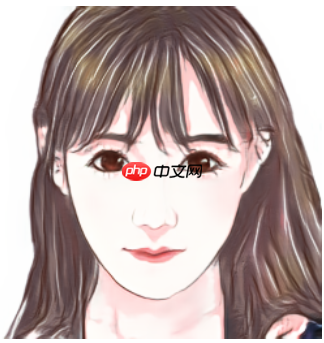
变身!!!
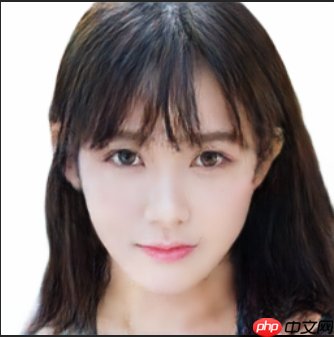
第三步、把真人化输出的照片输入进paddlebobo生成虚拟女友动画
3.1解压压缩包
In [11]!tar xzvf bobo.tar.gz PaddleBoBo data nltk_data work
3.2安装PaddleGAN和PaddleSpeech依赖
In [ ]#这一步执行时间会比较久!pip install ppgan paddlespeech
3.3动漫真人化图像生成虚拟女友动画
这一步用到了default.yaml的配置文件,如果你只是尝试的话使用默认配置即可,如果你需要生成另一个人像,请修改default.yaml配置。主要是修改输入照片的位置:PaddleBoBo/default.yaml 里面的FOM_INPUT_IMAGE: '/home/aistudio/work/output_01503.png'
In [ ]%cd PaddleBoBo !python create_virtual_human.py --config default.yaml
第四步、让虚拟女友纠正你的话语
--text 请输入之前生成的编号
In [ ]!python general_demo.py --human ./file/input/test.mp4 --output ../output.mp4 --text a
效果展示
以上就是【情人节特辑】:虚拟女友教你如何正确“回答”的详细内容,更多请关注其它相关文章!
# 工具
# 鱼台互联网营销推广
# 会让
# 如果你
# 请记住
# 多喝
# 美图
# 一言
# 请输入
# 如何正确
# 教你
# type
# peech
# fig
# udio
# igs
# ai
# python
# 中文网
# 衡阳网站建设收费价格
# 宁波seo优化课程公司
# 新蔡附近推广营销公司
# 汕头长沙seo优化
# 建设网站男人分手图片
# 东丽区网站建设推广
# 桐乡网络营销推广
# 分销推广网站怎么做的快
# 上海网站建设推进会通知
相关栏目:
【
行业资讯67740 】
【
技术百科0 】
【
网络运营39195 】
相关推荐:
虚拟机如何用命令清除垃圾
为什么夸克书架书单没了
ao3镜像网站哪个好
J*a数组静态怎么打
安全的ao3镜像网站链接入口
bugly是什么
如何提高import命令的性能
课程伴侣电脑怎么登录
苹果16有哪些变化尺寸
什么是域名解析 域名解析中采用了什么
如何用命令查看数据库日志文件
夸克搜题的原理是什么
access中如何使用常用宏命令
夸克解压什么意思
typescript 如何使用
typescript怎么使用vue
为什么用typescript
typescript在浏览器里怎么用
台达变频器power灯是什么意思
typescript和es6先学哪个
16苹果有哪些机型
苹果16主打颜色有哪些
学typescript需要什么基础么
苹果16如何预购
命令行下如何导出数据库
performance是什么意思
单身聊天app有哪些软件 2025最靠谱的单身交友软件推荐
linux如何使用db2命令
什么是夸克模组文件格式
华硕k20ce怎么装win7
.asm如何在命令行运行
如何右键打开命令窗口
单片机程序负数怎么表示
j*a数组元素怎么用
固态硬盘如何测试
grep命令的是如何实现
华为交换机如何复制命令行
笔记本如何使用固态硬盘
oppo手机nfc功能是什么意思
市盈率当中17A 18E是什么意思
typescript接口怎么选
平仓是什么意思?
为什么ai老是说链接面板中缺少某些文件
破太岁是什么意思
ensp命令如何提示
苹果16有哪些bug
华为如何面对苹果16
2025年哪个局域网聊天软件好用
显示器上power键是什么意思
固态硬盘2m如何修复
