






新闻中心 
科大讯飞-人脸关键点检测挑战赛:基础思路 MAE 2.2
 2025-07-17
 浏览次数:次
 返回列表
返回列表该内容是人脸关键点检测竞赛方案,涉及4个关键点检测。使用5千张带标注训练集和2千张测试集,数据含图像与坐标标注。构建了全连接和CNN两种模型,经数据加载、预处理、训练验证,CNN模型表现更优,40轮训练后验证集MAE约0.061,最后用模型对测试集预测并可视化结果。
☞☞☞AI 智能聊天, 问答助手, AI 智能搜索, 免费无限量使用 DeepSeek R1 模型☜☜☜

赛题介绍
人脸识别是基于人的面部特征信息进行身份识别的一种生物识别技术,金融和安防是目前人脸识别应用最广泛的两个领域。人脸关键点是人脸识别中的关键技术。人脸关键点检测需要识别出人脸的指定位置坐标,例如眉毛、眼睛、鼻子、嘴巴和脸部轮廓等位置坐标等。
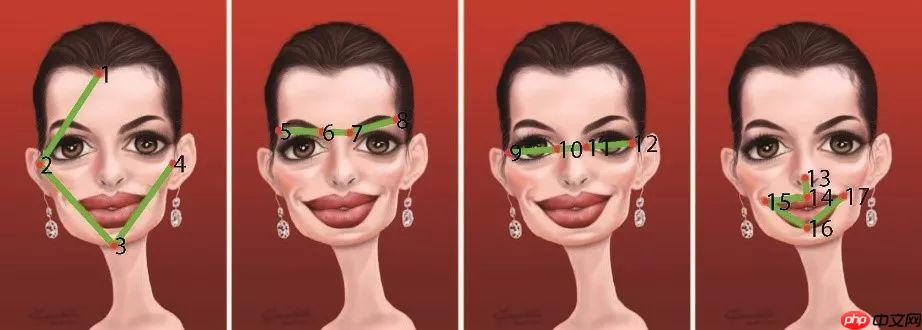
赛事任务
给定人脸图像,找到4个人脸关键点,赛题任务可以视为一个关键点检测问题。
训练集:5千张人脸图像,并且给定了具体的人脸关键点标注。
测试集:约2千张人脸图像,需要选手识别出具体的关键点位置。
 美图云修
美图云修
商业级AI影像处理工具
 50
查看详情
50
查看详情

数据说明
赛题数据由训练集和测试集组成,train.csv为训练集标注数据,train.npy和test.npy为训练集图片和测试集图片,可以使用numpy.load进行读取。
train.csv的信息为左眼坐标、右眼坐标、鼻子坐标和嘴巴坐标,总共8个点。
left_eye_center_x,left_eye_center_y,right_eye_center_x,right_eye_center_y,nose_tip_x,nose_tip_y,mouth_center_bottom_lip_x,mouth_center_bottom_lip_y66.3423640449,38.5236134831,28.9308404494,35.5777725843,49.256844943800004,68.2759550562,47.783946067399995,85.361582025568.9126037736,31.409116981100002,29.652226415100003,33.0280754717,51.913358490600004,48.408452830200005,50.6988679245,79.574037735868.7089943925,40.371149158899996,27.1308201869,40.9406803738,44.5025226168,69.9884859813,45.9264269159,86.2210093458
评审规则
本次竞赛的评价标准回归MAE进行评价,数值越小性能更优,最高分为0。评估代码参考:
from sklearn.metrics import mean_absolute_error
y_true = [3, -0.5, 2, 7]
y_pred = [2.5, 0.0, 2, 8]
mean_absolute_error(y_true, y_pred)
步骤1:数据集解压
In [1]!echo y | unzip -O CP936 /home/aistudio/data/data117050/人脸关键点检测挑战赛_数据集.zip!mv 人脸关键点检测挑战赛_数据集/* ./ !echo y | unzip test.npy.zip!echo y | unzip train.npy.zip
Archive:  /home/aistudio/data/data117050/人脸关键点检测挑战赛_数据集.zip
  inflating: 人脸关键点检测挑战赛_数据集/sample_submit.csv
  inflating: 人脸关键点检测挑战赛_数据集/test.npy.zip
  inflating: 人脸关键点检测挑战赛_数据集/train.csv
  inflating: 人脸关键点检测挑战赛_数据集/train.npy.zip
Archive:  test.npy.zip
replace test.npy? [y]es, [n]o, [A]ll, [N]one, [r]ename:   inflating: test.npy
Archive:  train.npy.zip
replace train.npy? [y]es, [n]o, [A]ll, [N]one, [r]ename:   inflating: train.npy
步骤2:数据集读取
In [2]import pandas as pdimport numpy as np
- train.csv:存储的是八个关键点的坐标。
- train.npy:训练集图像
- test.npy:测试集图像
# 读取标注train_df = pd.read_csv('train.csv')
train_df = train_df.fillna(48)
train_df.head()
left_eye_center_x left_eye_center_y right_eye_center_x \ 0 66.342364 38.523613 28.930840 1 68.912604 31.409117 29.652226 2 68.708994 40.371149 27.130820 3 65.334176 35.471878 29.366461 4 68.634857 29.999486 31.094571 right_eye_center_y nose_tip_x nose_tip_y mouth_center_bottom_lip_x \ 0 35.577773 49.256845 68.275955 47.783946 1 33.028075 51.913358 48.408453 50.698868 2 40.940680 44.502523 69.988486 45.926427 3 37.767684 50.411373 64.934767 50.028780 4 29.616429 50.247429 51.450857 47.948571 mouth_center_bottom_lip_y 0 85.361582 1 79.574038 2 86.221009 3 74.883241 4 84.394286In [4]
# 读取数据集train_img = np.load('train.npy')
test_img = np.load('test.npy')

train_img = np.transpose(train_img, [2, 0, 1])
train_img = train_img.reshape(-1, 1, 96, 96)

test_img = np.transpose(test_img, [2, 0, 1])
test_img = test_img.reshape(-1, 1, 96, 96)print(train_img.shape, test_img.shape)
(5000, 1, 96, 96) (2049, 1, 96, 96)
步骤3: 数据集可视化
In [5]%pylab inline idx = 409xy = train_df.iloc[idx].values.reshape(-1, 2) plt.scatter(xy[:, 0], xy[:, 1], c='r') plt.imshow(train_img[idx, 0, :, :], cmap='gray')
/opt/conda/envs/python35-paddle120-env/lib/python3.7/site-packages/matplotlib/__init__.py:107: DeprecationWarning: Using or importing the ABCs from 'collections' instead of from 'collections.abc' is deprecated, and in 3.8 it will stop working
  from collections import MutableMapping
/opt/conda/envs/python35-paddle120-env/lib/python3.7/site-packages/matplotlib/rcsetup.py:20: DeprecationWarning: Using or importing the ABCs from 'collections' instead of from 'collections.abc' is deprecated, and in 3.8 it will stop working
  from collections import Iterable, Mapping
/opt/conda/envs/python35-paddle120-env/lib/python3.7/site-packages/matplotlib/colors.py:53: DeprecationWarning: Using or importing the ABCs from 'collections' instead of from 'collections.abc' is deprecated, and in 3.8 it will stop working
  from collections import Sized
Populating the interactive namespace from numpy and matplotlib
/opt/conda/envs/python35-paddle120-env/lib/python3.7/site-packages/matplotlib/cbook/__init__.py:2349: DeprecationWarning: Using or importing the ABCs from 'collections' instead of from 'collections.abc' is deprecated, and in 3.8 it will stop working
  if isinstance(obj, collections.Iterator):
/opt/conda/envs/python35-paddle120-env/lib/python3.7/site-packages/matplotlib/cbook/__init__.py:2366: DeprecationWarning: Using or importing the ABCs from 'collections' instead of from 'collections.abc' is deprecated, and in 3.8 it will stop working
  return list(data) if isinstance(data, collections.MappingView) else data
<matplotlib.image.AxesImage at 0x7f917f910250>
/opt/conda/envs/python35-paddle120-env/lib/python3.7/site-packages/matplotlib/image.py:425: DeprecationWarning: np.asscalar(a) is deprecated since NumPy v1.16, use a.item() instead
  a_min = np.asscalar(a_min.astype(scaled_dtype))
/opt/conda/envs/python35-paddle120-env/lib/python3.7/site-packages/matplotlib/image.py:426: DeprecationWarning: np.asscalar(a) is deprecated since NumPy v1.16, use a.item() instead
  a_max = np.asscalar(a_max.astype(scaled_dtype))
<Figure size 432x288 with 1 Axes>In [6]
idx = 4090xy = train_df.iloc[idx].values.reshape(-1, 2)
plt.scatter(xy[:, 0], xy[:, 1], c='r')
plt.imshow(train_img[idx, 0, :, :], cmap='gray')
<matplotlib.image.AxesImage at 0x7f9158b1c550>
/opt/conda/envs/python35-paddle120-env/lib/python3.7/site-packages/matplotlib/image.py:425: DeprecationWarning: np.asscalar(a) is deprecated since NumPy v1.16, use a.item() instead
  a_min = np.asscalar(a_min.astype(scaled_dtype))
/opt/conda/envs/python35-paddle120-env/lib/python3.7/site-packages/matplotlib/image.py:426: DeprecationWarning: np.asscalar(a) is deprecated since NumPy v1.16, use a.item() instead
  a_max = np.asscalar(a_max.astype(scaled_dtype))
<Figure size 432x288 with 1 Axes>In [7]
xy = 96 - train_df.mean(0).values.reshape(-1, 2)
plt.scatter(xy[:, 0], xy[:, 1], c='r')
<matplotlib.collections.PathCollection at 0x7f9158b07ed0>
<Figure size 432x288 with 1 Axes>
步骤4:构建模型和数据集
In [8]import paddle paddle.__version__
'2.2.2'
全连接模型
In [9]from paddle.io import DataLoader, Datasetfrom PIL import Image# 自定义模型class MyDataset(Dataset):
def __init__(self, img, keypoint):
super(MyDataset, self).__init__()
self.img = img
self.keypoint = keypoint
def __getitem__(self, index):
img = Image.fromarray(self.img[index, 0, :, :]) return np.asarray(img).astype(np.float32)/255, self.keypoint[index] / 96.0
def __len__(self):
return len(self.keypoint)# 训练集train_dataset = MyDataset(
train_img[:-500, :, :, :],
paddle.to_tensor(train_df.values[:-500].astype(np.float32))
)
train_loader = DataLoader(train_dataset, batch_size=64, shuffle=True)# 验证集val_dataset = MyDataset(
train_img[-500:, :, :, :],
paddle.to_tensor(train_df.values[-500:].astype(np.float32))
)
val_loader = DataLoader(val_dataset, batch_size=64, shuffle=False)# 测试集test_dataset = MyDataset(
test_img[:, :, :],
paddle.to_tensor(np.zeros((test_img.shape[2], 8)))
)
test_loader = DataLoader(test_dataset, batch_size=64, shuffle=False)
In [10]
# 定义全连接模型model = paddle.nn.Sequential(
    paddle.nn.Flatten(),
    paddle.nn.Linear(96*96,128),
    paddle.nn.LeakyReLU(),
    paddle.nn.Linear(128, 8)
)

paddle.summary(model, (64, 96, 96))
W0123 00:43:41.304462 119 device_context.cc:447] Please NOTE: device: 0, GPU Compute Capability: 7.0, Driver API Version: 10.1, Runtime API Version: 10.1 W0123 00:43:41.309953 119 device_context.cc:465] device: 0, cuDNN Version: 7.6.
---------------------------------------------------------------------------
 Layer (type)       Input Shape          Output Shape         Param #
===========================================================================
   Flatten-1       [[64, 96, 96]]         [64, 9216]             0
   Linear-1         [[64, 9216]]          [64, 128]          1,179,776
  LeakyReLU-1       [[64, 128]]           [64, 128]              0
   Linear-2         [[64, 128]]            [64, 8]             1,032
===========================================================================
Total params: 1,180,808
Trainable params: 1,180,808
Non-trainable params: 0
---------------------------------------------------------------------------
Input size (MB): 2.25
Forward/backward pass size (MB): 4.63
Params size (MB): 4.50
Estimated Total Size (MB): 11.38
---------------------------------------------------------------------------
{'total_params': 1180808, 'trainable_params': 1180808}
In [11]
# 损失函数和优化器optimizer = paddle.optimizer.Adam(parameters=model.parameters(), learning_rate=0.0001)
criterion = paddle.nn.MSELoss()from sklearn.metrics import mean_absolute_errorfor epoch in range(0, 40):
    Train_Loss, Val_Loss = [], []
    Train_MAE, Val_MAE = [], []    # 训练
    model.train()    for i, (x, y) in enumerate(train_loader):
        pred = model(x)
        loss = criterion(pred, y)
        Train_Loss.append(loss.item())
        loss.backward()
        optimizer.step()
        optimizer.clear_grad()
        Train_MAE.append(mean_absolute_error(y.numpy(), pred.numpy()) * 96  / y.shape[0])
    # 验证
    model.eval()    for i, (x, y) in enumerate(val_loader):
        pred = model(x)
        loss = criterion(pred, y)
        Val_Loss.append(loss.item())
        Val_MAE.append(mean_absolute_error(y.numpy(), pred.numpy()) * 96 / y.shape[0])
    if epoch % 1 == 0:        print(f'\nEpoch: {epoch}')        print(f'Loss {np.mean(Train_Loss):3.5f}/{np.mean(Val_Loss):3.5f}')        print(f'MAE {np.mean(Train_MAE):3.5f}/{np.mean(Val_MAE):3.5f}')
Epoch: 0 Loss 0.05956/0.02340 MAE 0.25278/0.18601 Epoch: 1 Loss 0.02075/0.02269 MAE 0.17376/0.17984 Epoch: 2 Loss 0.01832/0.01881 MAE 0.16236/0.16371 Epoch: 3 Loss 0.01752/0.01729 MAE 0.15944/0.15727 Epoch: 4 Loss 0.01630/0.01783 MAE 0.15351/0.16075 Epoch: 5 Loss 0.01535/0.01593 MAE 0.14883/0.15059 Epoch: 6 Loss 0.01489/0.01655 MAE 0.14582/0.15519 Epoch: 7 Loss 0.01469/0.01596 MAE 0.14487/0.14971 Epoch: 8 Loss 0.01362/0.01582 MAE 0.13930/0.15087 Epoch: 9 Loss 0.01355/0.01506 MAE 0.13915/0.14637 Epoch: 10 Loss 0.01293/0.01490 MAE 0.13586/0.14514 Epoch: 11 Loss 0.01289/0.01367 MAE 0.13555/0.13847 Epoch: 12 Loss 0.01187/0.01372 MAE 0.12944/0.13950 Epoch: 13 Loss 0.01184/0.01281 MAE 0.12905/0.13358 Epoch: 14 Loss 0.01181/0.01534 MAE 0.12995/0.14891 Epoch: 15 Loss 0.01124/0.01334 MAE 0.12593/0.13727 Epoch: 16 Loss 0.01083/0.01371 MAE 0.12342/0.14003 Epoch: 17 Loss 0.01057/0.01181 MAE 0.12188/0.12769 Epoch: 18 Loss 0.01041/0.01207 MAE 0.12105/0.12884 Epoch: 19 Loss 0.01017/0.01149 MAE 0.11868/0.12613 Epoch: 20 Loss 0.00965/0.01348 MAE 0.11610/0.13499 Epoch: 21 Loss 0.00993/0.01133 MAE 0.11817/0.12543 Epoch: 22 Loss 0.00906/0.01080 MAE 0.11226/0.12200 Epoch: 23 Loss 0.00883/0.01117 MAE 0.11127/0.12394 Epoch: 24 Loss 0.00865/0.01064 MAE 0.10986/0.12086 Epoch: 25 Loss 0.00924/0.01023 MAE 0.11396/0.11844 Epoch: 26 Loss 0.00850/0.01001 MAE 0.10874/0.11812 Epoch: 27 Loss 0.00801/0.00998 MAE 0.10525/0.11665 Epoch: 28 Loss 0.00809/0.00978 MAE 0.10666/0.11558 Epoch: 29 Loss 0.00743/0.01073 MAE 0.10161/0.12184 Epoch: 30 Loss 0.00752/0.00916 MAE 0.10146/0.11186 Epoch: 31 Loss 0.00715/0.00982 MAE 0.09895/0.11673 Epoch: 32 Loss 0.00717/0.00907 MAE 0.09980/0.11068 Epoch: 33 Loss 0.00718/0.00967 MAE 0.09976/0.11560 Epoch: 34 Loss 0.00677/0.01463 MAE 0.09663/0.14721 Epoch: 35 Loss 0.00764/0.00852 MAE 0.10249/0.10766 Epoch: 36 Loss 0.00650/0.00916 MAE 0.09434/0.11061 Epoch: 37 Loss 0.00644/0.00840 MAE 0.09397/0.10676 Epoch: 38 Loss 0.00642/0.00852 MAE 0.09410/0.10684 Epoch: 39 Loss 0.00611/0.00798 MAE 0.09161/0.10284In [13]
# 预测函数def make_predict(model, loader):
    model.eval()
    predict_list = []    for i, (x, y) in enumerate(loader):
        pred = model(x)
        predict_list.append(pred.numpy())    return np.vstack(predict_list)

test_pred = make_predict(model, test_loader) * 96
In [14]
idx = 40xy = test_pred[idx, :].reshape(-1, 2)
plt.scatter(xy[:, 0], xy[:, 1], c='r')
plt.imshow(test_img[idx, 0, :, :], cmap='gray')
<matplotlib.image.AxesImage at 0x7fd715545490>
/opt/conda/envs/python35-paddle120-env/lib/python3.7/site-packages/matplotlib/image.py:425: DeprecationWarning: np.asscalar(a) is deprecated since NumPy v1.16, use a.item() instead
  a_min = np.asscalar(a_min.astype(scaled_dtype))
/opt/conda/envs/python35-paddle120-env/lib/python3.7/site-packages/matplotlib/image.py:426: DeprecationWarning: np.asscalar(a) is deprecated since NumPy v1.16, use a.item() instead
  a_max = np.asscalar(a_max.astype(scaled_dtype))
<Figure size 432x288 with 1 Axes>In [15]
idx = 42xy = test_pred[idx, :].reshape(-1, 2)
plt.scatter(xy[:, 0], xy[:, 1], c='r')
plt.imshow(test_img[idx, 0, :, :], cmap='gray')
<matplotlib.image.AxesImage at 0x7fd7144d9350>
<Figure size 432x288 with 1 Axes>
CNN模型
In [17]from paddle.io import DataLoader, Datasetfrom PIL import Imageclass MyDataset(Dataset):
def __init__(self, img, keypoint):
super(MyDataset, self).__init__()
self.img = img
self.keypoint = keypoint
def __getitem__(self, index):
img = Image.fromarray(self.img[index, 0, :, :]) return np.asarray(img).reshape(1, 96, 96).astype(np.float32)/255, self.keypoint[index] / 96.0
def __len__(self):
return len(self.keypoint)
train_dataset = MyDataset(
train_img[:-500, :, :, :],
paddle.to_tensor(train_df.values[:-500].astype(np.float32))
)
train_loader = DataLoader(train_dataset, batch_size=64, shuffle=True)
val_dataset = MyDataset(
train_img[-500:, :, :, :],
paddle.to_tensor(train_df.values[-500:].astype(np.float32))
)
val_loader = DataLoader(val_dataset, batch_size=64, shuffle=False)
test_dataset = MyDataset(
test_img[:, :, :],
paddle.to_tensor(np.zeros((test_img.shape[2], 8)))
)
test_loader = DataLoader(test_dataset, batch_size=64, shuffle=False)
In [18]
# 卷积模型model = paddle.nn.Sequential(
    paddle.nn.Conv2D(1, 10, (5, 5)),
    paddle.nn.ReLU(),
    paddle.nn.MaxPool2D((2, 2)),

    paddle.nn.Conv2D(10, 20, (5, 5)),
    paddle.nn.ReLU(),
    paddle.nn.MaxPool2D((2, 2)),

    paddle.nn.Conv2D(20, 40, (5, 5)),
    paddle.nn.ReLU(),
    paddle.nn.MaxPool2D((2, 2)),

    paddle.nn.Flatten(),
    paddle.nn.Linear(2560, 8),
)

paddle.summary(model, (64, 1, 96, 96))
---------------------------------------------------------------------------
Layer (type) Input Shape Output Shape Param #
===========================================================================
Conv2D-4 [[64, 1, 96, 96]] [64, 10, 92, 92] 260
ReLU-4 [[64, 10, 92, 92]] [64, 10, 92, 92] 0
MaxPool2D-4 [[64, 10, 92, 92]] [64, 10, 46, 46] 0
Conv2D-5 [[64, 10, 46, 46]] [64, 20, 42, 42] 5,020
ReLU-5 [[64, 20, 42, 42]] [64, 20, 42, 42] 0
MaxPool2D-5 [[64, 20, 42, 42]] [64, 20, 21, 21] 0
Conv2D-6 [[64, 20, 21, 21]] [64, 40, 17, 17] 20,040
ReLU-6 [[64, 40, 17, 17]] [64, 40, 17, 17] 0
MaxPool2D-6 [[64, 40, 17, 17]] [64, 40, 8, 8] 0
Flatten-3 [[64, 40, 8, 8]] [64, 2560] 0
Linear-4 [[64, 2560]] [64, 8] 20,488
===========================================================================
Total params: 45,808
Trainable params: 45,808
Non-trainable params: 0
---------------------------------------------------------------------------
Input size (MB): 2.25
Forward/backward pass size (MB): 145.54
Params size (MB): 0.17
Estimated Total Size (MB): 147.97
---------------------------------------------------------------------------
{'total_params': 45808, 'trainable_params': 45808}
In [19]
# 损失函数和优化器optimizer = paddle.optimizer.Adam(parameters=model.parameters(), learning_rate=0.0001)
criterion = paddle.nn.MSELoss()from sklearn.metrics import mean_absolute_errorfor epoch in range(0, 40):
    Train_Loss, Val_Loss = [], []
    Train_MAE, Val_MAE = [], []
    # 训练
    model.train()    for i, (x, y) in enumerate(train_loader):
        pred = model(x)

        loss = criterion(pred, y)
        Train_Loss.append(loss.item())
        loss.backward()
        optimizer.step()
        optimizer.clear_grad()
        Train_MAE.append(mean_absolute_error(y.numpy(), pred.numpy()) * 96  / y.shape[0])
    # 验证
    model.eval()    for i, (x, y) in enumerate(val_loader):
        pred = model(x)
        loss = criterion(pred, y)
        Val_Loss.append(loss.item())
        Val_MAE.append(mean_absolute_error(y.numpy(), pred.numpy()) * 96 / y.shape[0])
    if epoch % 1 == 0:        print(f'\nEpoch: {epoch}')        print(f'Loss {np.mean(Train_Loss):3.5f}/{np.mean(Val_Loss):3.5f}')        print(f'MAE {np.mean(Train_MAE):3.5f}/{np.mean(Val_MAE):3.5f}')
Epoch: 0 Loss 0.23343/0.03865 MAE 0.44735/0.23946 Epoch: 1 Loss 0.03499/0.03301 MAE 0.22689/0.22072 Epoch: 2 Loss 0.03006/0.02846 MAE 0.20913/0.20492 Epoch: 3 Loss 0.02614/0.02548 MAE 0.19541/0.19341 Epoch: 4 Loss 0.02270/0.02314 MAE 0.18112/0.18211 Epoch: 5 LoIn [20]ss 0.01965/0.01952 MAE 0.16927/0.16763 Epoch: 6 Loss 0.01704/0.01763 MAE 0.15715/0.15866 Epoch: 7 Loss 0.01492/0.01483 MAE 0.14711/0.14516 Epoch: 8 Loss 0.01260/0.01268 MAE 0.13498/0.13350 Epoch: 9 Loss 0.01034/0.00996 MAE 0.12187/0.11828 Epoch: 10 Loss 0.00855/0.00836 MAE 0.11041/0.10738 Epoch: 11 Loss 0.00751/0.00737 MAE 0.10320/0.10133 Epoch: 12 Loss 0.00644/0.00657 MAE 0.09478/0.09471 Epoch: 13 Loss 0.00592/0.00626 MAE 0.09048/0.09321 Epoch: 14 Loss 0.00556/0.00568 MAE 0.08704/0.08790 Epoch: 15 Loss 0.00518/0.00538 MAE 0.08444/0.08551 Epoch: 16 Loss 0.00491/0.00524 MAE 0.08204/0.08433 Epoch: 17 Loss 0.00474/0.00495 MAE 0.08087/0.08178 Epoch: 18 Loss 0.00450/0.00476 MAE 0.07885/0.08041 Epoch: 19 Loss 0.00431/0.00460 MAE 0.07685/0.07922 Epoch: 20 Loss 0.00421/0.00458 MAE 0.07596/0.07887 Epoch: 21 Loss 0.00393/0.00421 MAE 0.07302/0.07515 Epoch: 22 Loss 0.00387/0.00419 MAE 0.07282/0.07502 Epoch: 23 Loss 0.00373/0.00416 MAE 0.07131/0.07482 Epoch: 24 Loss 0.00354/0.00385 MAE 0.06945/0.07177 Epoch: 25 Loss 0.00347/0.00386 MAE 0.06882/0.07173 Epoch: 26 Loss 0.00340/0.00368 MAE 0.06781/0.06999 Epoch: 27 Loss 0.00323/0.00363 MAE 0.06601/0.06949 Epoch: 28 Loss 0.00320/0.00349 MAE 0.06580/0.06794 Epoch: 29 Loss 0.00307/0.00349 MAE 0.06427/0.06842 Epoch: 30 Loss 0.00300/0.00336 MAE 0.06357/0.06692 Epoch: 31 Loss 0.00291/0.00329 MAE 0.06240/0.06611 Epoch: 32 Loss 0.00287/0.00326 MAE 0.06206/0.06594 Epoch: 33 Loss 0.00280/0.00323 MAE 0.06119/0.06572 Epoch: 34 Loss 0.00276/0.00312 MAE 0.06076/0.06427 Epoch: 35 Loss 0.00268/0.00304 MAE 0.05994/0.06345 Epoch: 36 Loss 0.00262/0.00301 MAE 0.05915/0.06306 Epoch: 37 Loss 0.00256/0.00294 MAE 0.05834/0.06231 Epoch: 38 Loss 0.00256/0.00288 MAE 0.05833/0.06166 Epoch: 39 Loss 0.00246/0.00284 MAE 0.05717/0.06128
 ss 0.01965/0.01952
MAE 0.16927/0.16763
Epoch: 6
Loss 0.01704/0.01763
MAE 0.15715/0.15866
Epoch: 7
Loss 0.01492/0.01483
MAE 0.14711/0.14516
Epoch: 8
Loss 0.01260/0.01268
MAE 0.13498/0.13350
Epoch: 9
Loss 0.01034/0.00996
MAE 0.12187/0.11828
Epoch: 10
Loss 0.00855/0.00836
MAE 0.11041/0.10738
Epoch: 11
Loss 0.00751/0.00737
MAE 0.10320/0.10133
Epoch: 12
Loss 0.00644/0.00657
MAE 0.09478/0.09471
Epoch: 13
Loss 0.00592/0.00626
MAE 0.09048/0.09321
Epoch: 14
Loss 0.00556/0.00568
MAE 0.08704/0.08790
Epoch: 15
Loss 0.00518/0.00538
MAE 0.08444/0.08551
Epoch: 16
Loss 0.00491/0.00524
MAE 0.08204/0.08433
Epoch: 17
Loss 0.00474/0.00495
MAE 0.08087/0.08178
Epoch: 18
Loss 0.00450/0.00476
MAE 0.07885/0.08041
Epoch: 19
Loss 0.00431/0.00460
MAE 0.07685/0.07922
Epoch: 20
Loss 0.00421/0.00458
MAE 0.07596/0.07887
Epoch: 21
Loss 0.00393/0.00421
MAE 0.07302/0.07515
Epoch: 22
Loss 0.00387/0.00419
MAE 0.07282/0.07502
Epoch: 23
Loss 0.00373/0.00416
MAE 0.07131/0.07482
Epoch: 24
Loss 0.00354/0.00385
MAE 0.06945/0.07177
Epoch: 25
Loss 0.00347/0.00386
MAE 0.06882/0.07173
Epoch: 26
Loss 0.00340/0.00368
MAE 0.06781/0.06999
Epoch: 27
Loss 0.00323/0.00363
MAE 0.06601/0.06949
Epoch: 28
Loss 0.00320/0.00349
MAE 0.06580/0.06794
Epoch: 29
Loss 0.00307/0.00349
MAE 0.06427/0.06842
Epoch: 30
Loss 0.00300/0.00336
MAE 0.06357/0.06692
Epoch: 31
Loss 0.00291/0.00329
MAE 0.06240/0.06611
Epoch: 32
Loss 0.00287/0.00326
MAE 0.06206/0.06594
Epoch: 33
Loss 0.00280/0.00323
MAE 0.06119/0.06572
Epoch: 34
Loss 0.00276/0.00312
MAE 0.06076/0.06427
Epoch: 35
Loss 0.00268/0.00304
MAE 0.05994/0.06345
Epoch: 36
Loss 0.00262/0.00301
MAE 0.05915/0.06306
Epoch: 37
Loss 0.00256/0.00294
MAE 0.05834/0.06231
Epoch: 38
Loss 0.00256/0.00288
MAE 0.05833/0.06166
Epoch: 39
Loss 0.00246/0.00284
MAE 0.05717/0.06128
ss 0.01965/0.01952
MAE 0.16927/0.16763
Epoch: 6
Loss 0.01704/0.01763
MAE 0.15715/0.15866
Epoch: 7
Loss 0.01492/0.01483
MAE 0.14711/0.14516
Epoch: 8
Loss 0.01260/0.01268
MAE 0.13498/0.13350
Epoch: 9
Loss 0.01034/0.00996
MAE 0.12187/0.11828
Epoch: 10
Loss 0.00855/0.00836
MAE 0.11041/0.10738
Epoch: 11
Loss 0.00751/0.00737
MAE 0.10320/0.10133
Epoch: 12
Loss 0.00644/0.00657
MAE 0.09478/0.09471
Epoch: 13
Loss 0.00592/0.00626
MAE 0.09048/0.09321
Epoch: 14
Loss 0.00556/0.00568
MAE 0.08704/0.08790
Epoch: 15
Loss 0.00518/0.00538
MAE 0.08444/0.08551
Epoch: 16
Loss 0.00491/0.00524
MAE 0.08204/0.08433
Epoch: 17
Loss 0.00474/0.00495
MAE 0.08087/0.08178
Epoch: 18
Loss 0.00450/0.00476
MAE 0.07885/0.08041
Epoch: 19
Loss 0.00431/0.00460
MAE 0.07685/0.07922
Epoch: 20
Loss 0.00421/0.00458
MAE 0.07596/0.07887
Epoch: 21
Loss 0.00393/0.00421
MAE 0.07302/0.07515
Epoch: 22
Loss 0.00387/0.00419
MAE 0.07282/0.07502
Epoch: 23
Loss 0.00373/0.00416
MAE 0.07131/0.07482
Epoch: 24
Loss 0.00354/0.00385
MAE 0.06945/0.07177
Epoch: 25
Loss 0.00347/0.00386
MAE 0.06882/0.07173
Epoch: 26
Loss 0.00340/0.00368
MAE 0.06781/0.06999
Epoch: 27
Loss 0.00323/0.00363
MAE 0.06601/0.06949
Epoch: 28
Loss 0.00320/0.00349
MAE 0.06580/0.06794
Epoch: 29
Loss 0.00307/0.00349
MAE 0.06427/0.06842
Epoch: 30
Loss 0.00300/0.00336
MAE 0.06357/0.06692
Epoch: 31
Loss 0.00291/0.00329
MAE 0.06240/0.06611
Epoch: 32
Loss 0.00287/0.00326
MAE 0.06206/0.06594
Epoch: 33
Loss 0.00280/0.00323
MAE 0.06119/0.06572
Epoch: 34
Loss 0.00276/0.00312
MAE 0.06076/0.06427
Epoch: 35
Loss 0.00268/0.00304
MAE 0.05994/0.06345
Epoch: 36
Loss 0.00262/0.00301
MAE 0.05915/0.06306
Epoch: 37
Loss 0.00256/0.00294
MAE 0.05834/0.06231
Epoch: 38
Loss 0.00256/0.00288
MAE 0.05833/0.06166
Epoch: 39
Loss 0.00246/0.00284
MAE 0.05717/0.06128def make_predict(model, loader):
model.eval()
predict_list = [] for i, (x, y) in enumerate(loader):
pred = model(x)
predict_list.append(pred.numpy()) return np.vstack(predict_list)
test_pred = make_predict(model, test_loader) * 96
In [21]
idx = 40xy = test_pred[idx, :].reshape(-1, 2)
plt.scatter(xy[:, 0], xy[:, 1], c='r')
plt.imshow(test_img[idx, 0, :, :], cmap='gray')
<matplotlib.image.AxesImage at 0x7f883439f290>
/opt/conda/envs/python35-paddle120-env/lib/python3.7/site-packages/matplotlib/image.py:425: DeprecationWarning: np.asscalar(a) is deprecated since NumPy v1.16, use a.item() instead
  a_min = np.asscalar(a_min.astype(scaled_dtype))
/opt/conda/envs/python35-paddle120-env/lib/python3.7/site-packages/matplotlib/image.py:426: DeprecationWarning: np.asscalar(a) is deprecated since NumPy v1.16, use a.item() instead
  a_max = np.asscalar(a_max.astype(scaled_dtype))
<Figure size 432x288 with 1 Axes>In [22]
idx = 42xy = test_pred[idx, :].reshape(-1, 2)
plt.scatter(xy[:, 0], xy[:, 1], c='r')
plt.imshow(test_img[idx, 0, :, :], cmap='gray')
<matplotlib.image.AxesImage at 0x7f8834329d10>
/opt/conda/envs/python35-paddle120-env/lib/python3.7/site-packages/matplotlib/image.py:425: DeprecationWarning: np.asscalar(a) is deprecated since NumPy v1.16, use a.item() instead
  a_min = np.asscalar(a_min.astype(scaled_dtype))
/opt/conda/envs/python35-paddle120-env/lib/python3.7/site-packages/matplotlib/image.py:426: DeprecationWarning: np.asscalar(a) is deprecated since NumPy v1.16, use a.item() instead
  a_max = np.asscalar(a_max.astype(scaled_dtype))
<Figure size 432x288 with 1 Axes>
以上就是科大讯飞-人脸关键点检测挑战赛:基础思路 MAE 2.2的详细内容,更多请关注其它相关文章!
# 的人
# 小红书SEO优化价格
# 谷歌seo关键词整理
# 福建专业seo介绍公司
# 万州提升seo关键词排名公司
# 杭州网站建设高端公司
# 荆州网站关键词优化方法
# 免费推广平台seo
# 网站首页排名优化方法
# 永城网站建设代理公司
# 黄州seo推广网址大全
# 相关文章
# 两种
# 的是
# python
# 官网
# 中文网
# 科大
# 美图
# 一言
# type
# fig
# latte
# udio
# 征信
# red
# ai
相关栏目:
【
行业资讯67740 】
【
技术百科0 】
【
网络运营39195 】
相关推荐:
ensp命令如何提示
如何提高import命令的性能
固态硬盘如何外接
固态硬盘如何测试
显卡上面TYPE-C是什么接口
哪些编程软件需用typescript
如何区别固态硬盘
苹果16如何预购
春运抢票用不用取票码
typescript需要学多久
爱奇艺视频怎么下载到手机u盘怎么转换格式方法
typescript什么意思
商誉是什么意思
为什么youtube音乐打不开
春运抢票多久可以买到票
通配符的用法
typescript如何使用viewer
新固态硬盘如何装系统
苹果16会有哪些更新
固态硬盘如何保存
自己如何安装固态硬盘
如何使用net命令
typescript要用什么工具
苹果16送哪些配件
干股是什么意思
折叠屏手机哪个有性价比
皓影混动仪表盘上power是什么意思
typescript怎么解析vue TypeScript在vue中的使用最新解读
vue中datediff函数怎么用
哪个牌子的折叠屏手机好
春运抢票到哪里抢票啊
如何开发typescript
单片机怎么控制内功率
对应市盈率是30X是什么意思
linux如何调出命令行
夸克文字口令是什么意思
夸克为什么会变小
如何提高固态硬盘速度
openwrt有什么用
react怎么用typescript
忐忑不安是什么意思
公司的tm市盈率为负是什么意思
固态硬盘如何4k对其
iPhone无法打开YouTube原因分析与解决方案
得物怎样降低手续费 得物如何降低手续费教程
如何安装m.2固态硬盘
苹果16日发售哪些机型
光猫power和pon常亮是什么意思
一年多少周
typescript 如何解决 null
