






新闻中心 
【PaddleHub模型贡献】一行代码实现蛇种识别
 2025-07-31
 浏览次数:次
 返回列表
返回列表该内容围绕蛇类识别模型展开,先安装PaddleX,解压数据集并划分,设置GPU后进行图像预处理与增强,定义数据迭代器,用ResNet50_vd_ssld模型训练,接着导出并转换模型为PaddleHub模块,测试单张和多张图片识别效果,最后介绍在GitHub提pr的步骤。
☞☞☞AI 智能聊天, 问答助手, AI 智能搜索, 免费无限量使用 DeepSeek R1 模型☜☜☜
一、模型开发
1.安装必要的资源库
原项目使用PaddleX开发,因此这里先安装PaddleX:
In [5]!pip install paddlex
2.数据预处理
2.1解压数据集
In [2]!unzip data/data44587/snake_data.zip -d /home/aistudio/
2.2划分训练集
In [ ]!paddlex --split_dataset --format ImageNet --dataset_dir '/home/aistudio/snake_data' --val_value 0.2 --test_value 0.1
3.模型训练
3.1设置使用0号GPU卡
In [ ]import matplotlib
matplotlib.use('Agg')
import os
os.environ['CUDA_VISIBLE_DEVICES'] = '0'import paddlex as pdx
3.2图像预处理+数据增强
In [ ]from paddlex.cls import transforms
train_transforms = transforms.Compose([
transforms.RandomCrop(crop_size=224),
transforms.RandomHorizontalFlip(),
transforms.Normalize()
])
eval_transforms = transforms.Compose([
transforms.ResizeByShort(short_size=256),
transforms.CenterCrop(crop_size=224),
transforms.Normalize()
])
3.3数据迭代器的定义
In [ ]train_dataset = pdx.datasets.ImageNet(
data_dir='snake_data',
file_list='snake_data/train_list.txt',
label_list='snake_data/labels.txt',
transforms=train_transforms,
shuffle=True)
eval_dataset = pdx.datasets.ImageNet(
data_dir='snake_data',
file_list='snake_data/val_list.txt',
label_list='snake_data/labels.txt',
transforms=eval_transforms)
2025-07-19 11:49:17 [INFO]	Starting to read file list from dataset...
2025-07-19 11:49:17 [INFO]	17364 samples in file snake_data/train_list.txt
2025-07-19 11:49:17 [INFO]	Starting to read file list from dataset...
2025-07-19 11:49:17 [INFO]	25 samples in file snake_data/val_list.txt
3.4开始炼丹
In [ ]num_classes = len(train_dataset.labels)
model = pdx.cls.ResNet50_vd_ssld(num_classes=num_classes)
model.train(num_epochs = 60,
s*e_interval_epochs = 10,
train_dataset = train_dataset,
train_batch_size = 64,
eval_dataset = eval_dataset,
learning_rate = 0.025,
warmup_steps = 1084,
warmup_start_lr = 0.0001,
lr_decay_epochs=[20, 40],
lr_decay_gamma = 0.025,
s*e_dir='/home/aistudio',
use_vdl=True)
4.查看模型预测效果
In [ ]import cv2import matplotlib.pyplot as plt# 加载模型print('**************************************加载模型*****************************************')
model = pdx.load_model('best_model')# 显示图片img = cv2.imread('test.jpg')
b,g,r = cv2.split(img)
img = cv2.merge([r,g,b])
%matplotlib inline
plt.imshow(img)# 预测result = model.predict('test.jpg', topk=3)print(' **************************************预测*****************************************')print(result[0])
 **************************************预测*****************************************')print(result[0])
**************************************加载模型*****************************************
2025-07-19 14:21:06 [INFO] Model[ResNet50_vd_ssld] loaded.
**************************************预测*****************************************
{'category_id': 4, 'category': '西部菱斑响尾蛇', 'score': 0.9999999}
<Figure size 432x288 with 1 Axes>
二、封装Module
1.导出inference模型
| 参数 | 说明 |
|---|---|
| --model_dir | inference模型所在的文件地址,文件包括:.pdparams、.pdopt、.pdmodel、.json和.yml |
| --s*e_dir | 导出inference模型,文件将包括:__model__、__params__和model.yml |
!paddlex --export_inference --model_dir=best_model --s*e_dir=./inference_model/ResNet50_vd_ssld
W0717 23:24:19.157521 13809 device_context.cc:252] Please NOTE: device: 0, CUDA Capability: 70, Driver API Version: 9.2, Runtime API Version: 9.0
W0717 23:24:19.161340 13809 device_context.cc:260] device: 0, cuDNN Version: 7.3.
2025-07-17 23:24:22 [INFO]	Model[ResNet50_vd_ssld] loaded.
2025-07-17 23:24:22 [INFO]	Model for inference deploy s*ed in ./inference_model/ResNet50_vd_ssld.
2.模型转换
PaddleX模型可以快速转换成PaddleHub模型,只需要用下面这一句命令即可:
In [1]!hub convert --model_dir inference_model/ResNet50_vd_ssld \
--module_name SnakeIdentification \
--module_version 1.0.0 \
--output_dir outputs
转换成功后的模型保存在outputs文件夹下,我们解压一下:
In [3]!gzip -dfq /home/aistudio/outputs/SnakeIdentification.tar.gz !tar -xf /home/aistudio/outputs/SnakeIdentification.tar
3.模型安装
安装我们刚刚转换的模型:
In [6]!hub install SnakeIdentification
/opt/conda/envs/python35-paddle120-env/lib/python3.7/site-packages/setuptools/depends.py:2: DeprecationWarning: the imp module is deprecated in f*our of importlib; see the module's documentation for alternative uses
  import imp
/opt/conda/envs/python35-paddle120-env/lib/python3.7/site-packages/matplotlib/__init__.py:107: DeprecationWarning: Using or importing the ABCs from 'collections' instead of from 'collections.abc' is deprecated, and in 3.8 it will stop working
  from collections import MutableMapping
/opt/conda/envs/python35-paddle120-env/lib/python3.7/site-packages/matplotlib/rcsetup.py:20: DeprecationWarning: Using or importing the ABCs from 'collections' instead of from 'collections.abc' is deprecated, and in 3.8 it will stop working
  from collections import Iterable, Mapping
/opt/conda/envs/python35-paddle120-env/lib/python3.7/site-packages/matplotlib/colors.py:53: DeprecationWarning: Using or importing the ABCs from 'collections' instead of from 'collections.abc' is deprecated, and in 3.8 it will stop working
  from collections import Sized[2025-03-12 10:45:54,828] [    INFO] - Successfully uninstalled SnakeIdentification[2025-03-12 10:45:55,105] [    INFO] - Successfully installed SnakeIdentification-1.0.0
4.模型预测
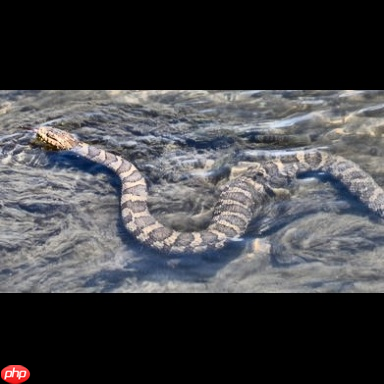
预测单张图片
 In [12]
import cv2import paddlehub as hub

module = hub.Module(name="SnakeIdentification")

images = [cv2.imread('snake_data/class_1/2421.jpg')]# execute predict and print the resultresults = module.predict(images=images)for result in results:    print(result)
[2025-03-12 10:55:05,972] [ WARNING] - The _initialize method in HubModule will soon be deprecated, you can use the __init__() to handle the initialization of the object
[{'category_id': 0, 'category': '水蛇', 'score': 0.9999205}]
预测多张图片
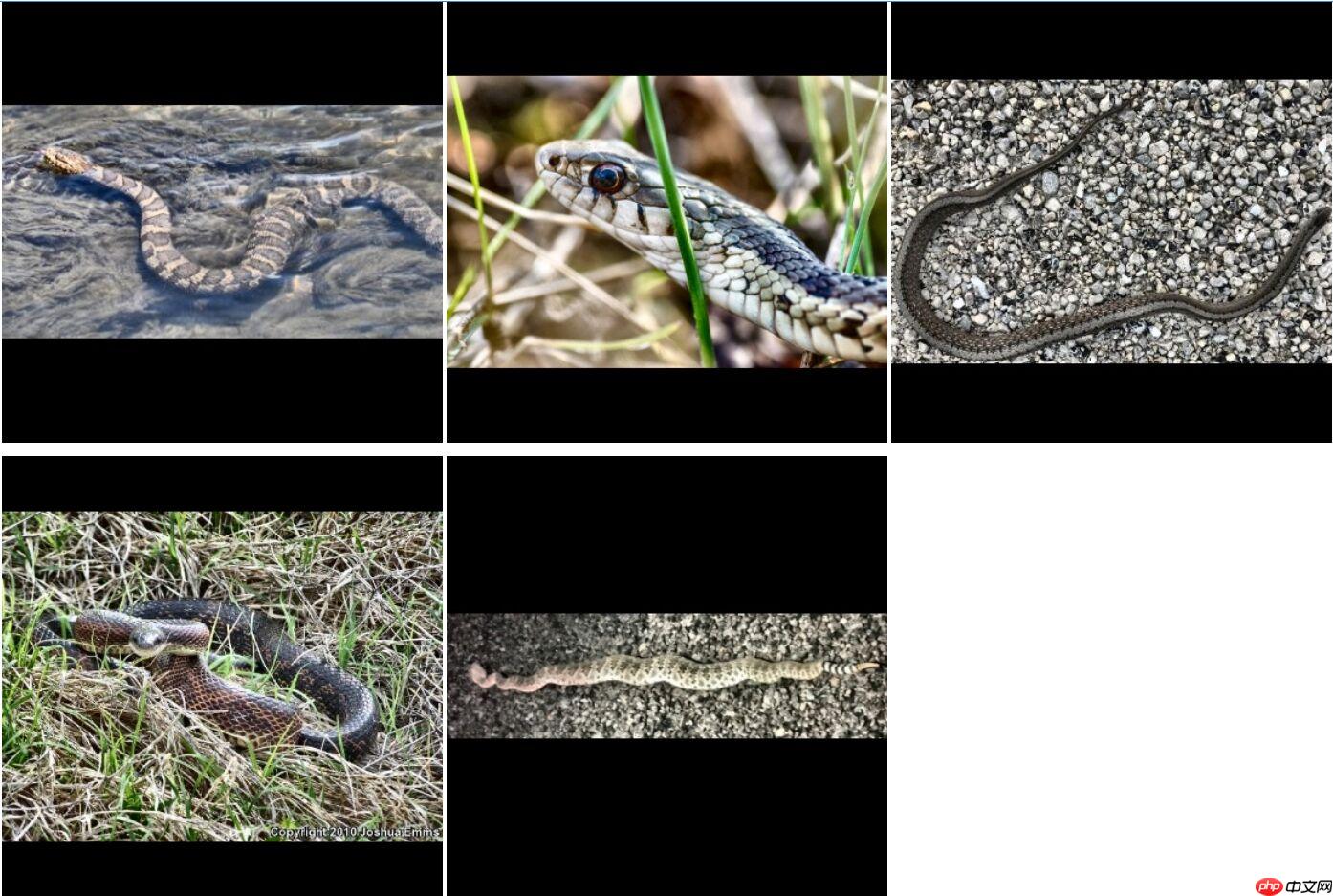
选取5张图片,每张图片对应一个类别:
 In [13]
import cv2import paddlehub as hub

module = hub.Module(name="SnakeIdentification")

images = [cv2.imread('snake_data/class_1/2421.jpg'), cv2.imread('snake_data/class_2/113.jpg'), cv2.imread('snake_data/class_3/757.jpg'),
          cv2.imread('snake_data/class_4/1101.jpg'), cv2.imread('snake_data/class_5/2566.jpg')]# execute predict and print the resultresults = module.predict(images=images)for result in results:    print(result)
[2025-03-12 11:00:07,036] [ WARNING] - The _initialize method in HubModule will soon be deprecated, you can use the __init__() to handle the initialization of the object
[{'category_id': 0, 'category': '水蛇', 'score': 0.9999205}]
[{'category_id': 1, 'category': '剑纹带蛇', 'score': 0.9988399}]
[{'category_id': 2, 'category': '德凯斯氏蛇', 'score': 0.9867851}]
[{'category_id': 3, 'category': '黑鼠蛇', 'score': 0.9468411}]
[{'category_id': 4, 'category': '西部菱斑响尾蛇', 'score': 1.0}]
三、在GitHub上提pr
pr就是Pull Request(翻译过来就是:拉取请求)的简称
1.Fork PaddleHub
进入PaddleHub的源码仓库https://github.com/PaddlePaddle/PaddleHub

看到这个箭头指向的按钮了吗?点它!!!
 Motiff妙多
Motiff妙多是一款AI驱动的界面设计工具,定位为“AI时代设计工具”
 334
查看详情
334
查看详情

如果可以的话,可以顺手把它旁边的Star给点了(手动狗头)
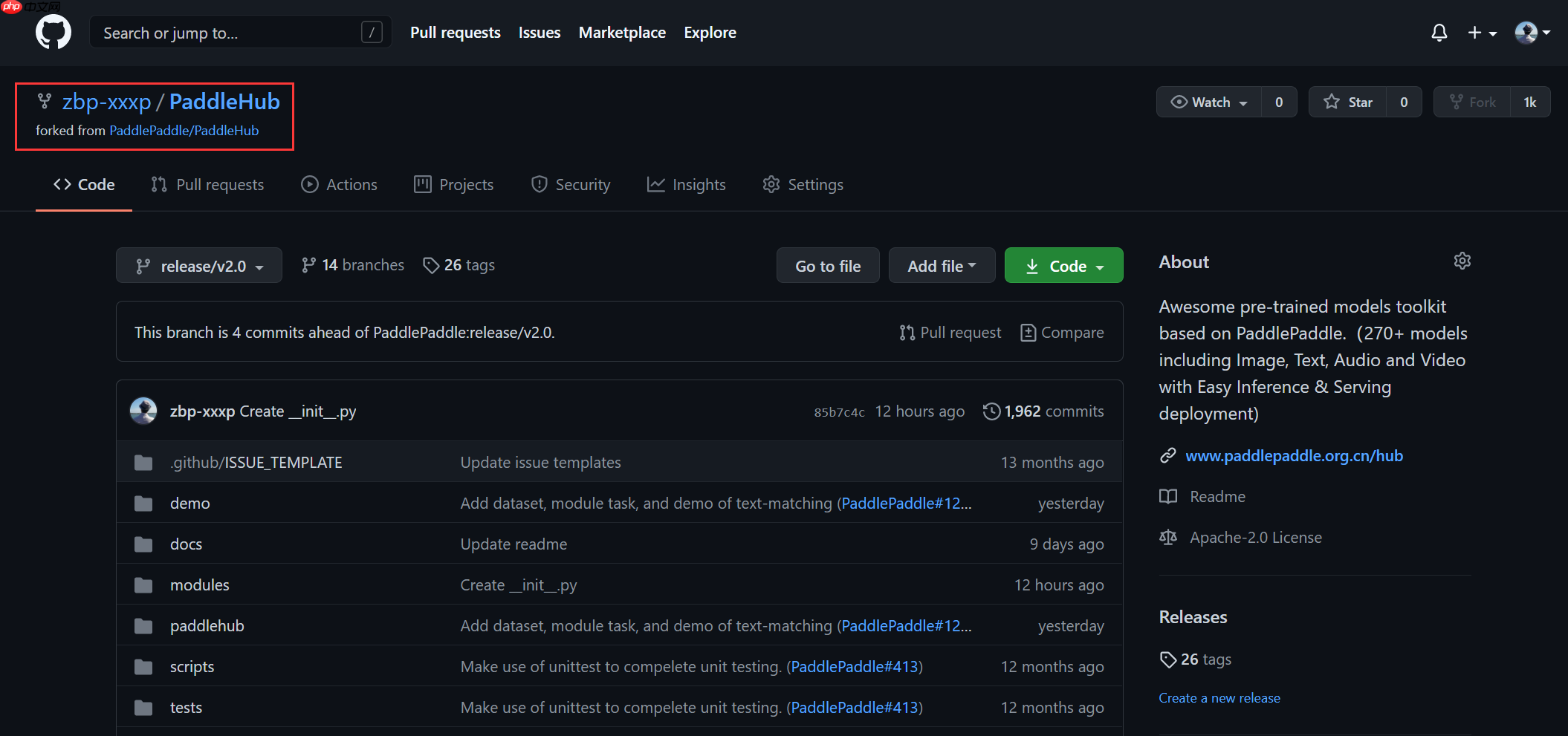
点击以后,你的账号下面就有一个叫PaddleHub的代码仓库了,就像这样:
2.上传Module
本项目是图像分类的项目,所以进入到图像分类的目录下:
PaddleHub/modules/image/classification/
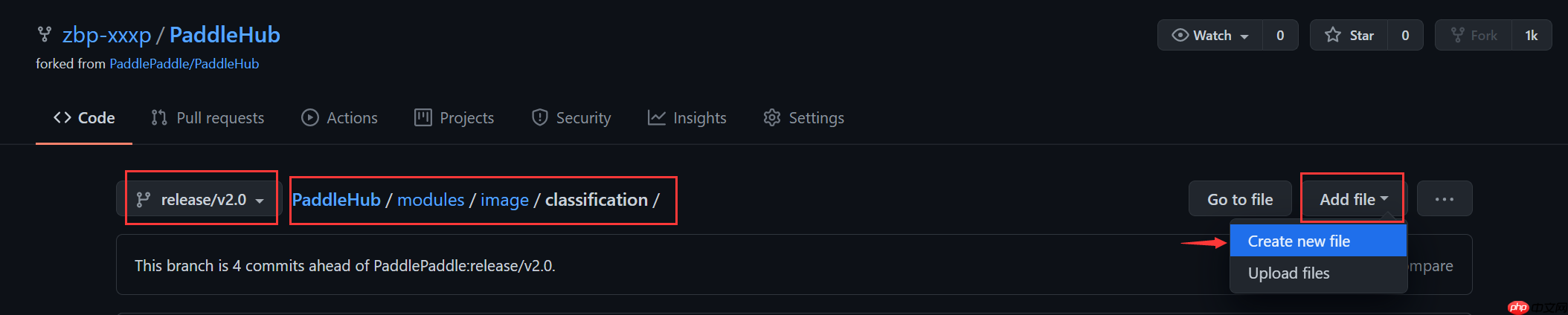
点击Add file:
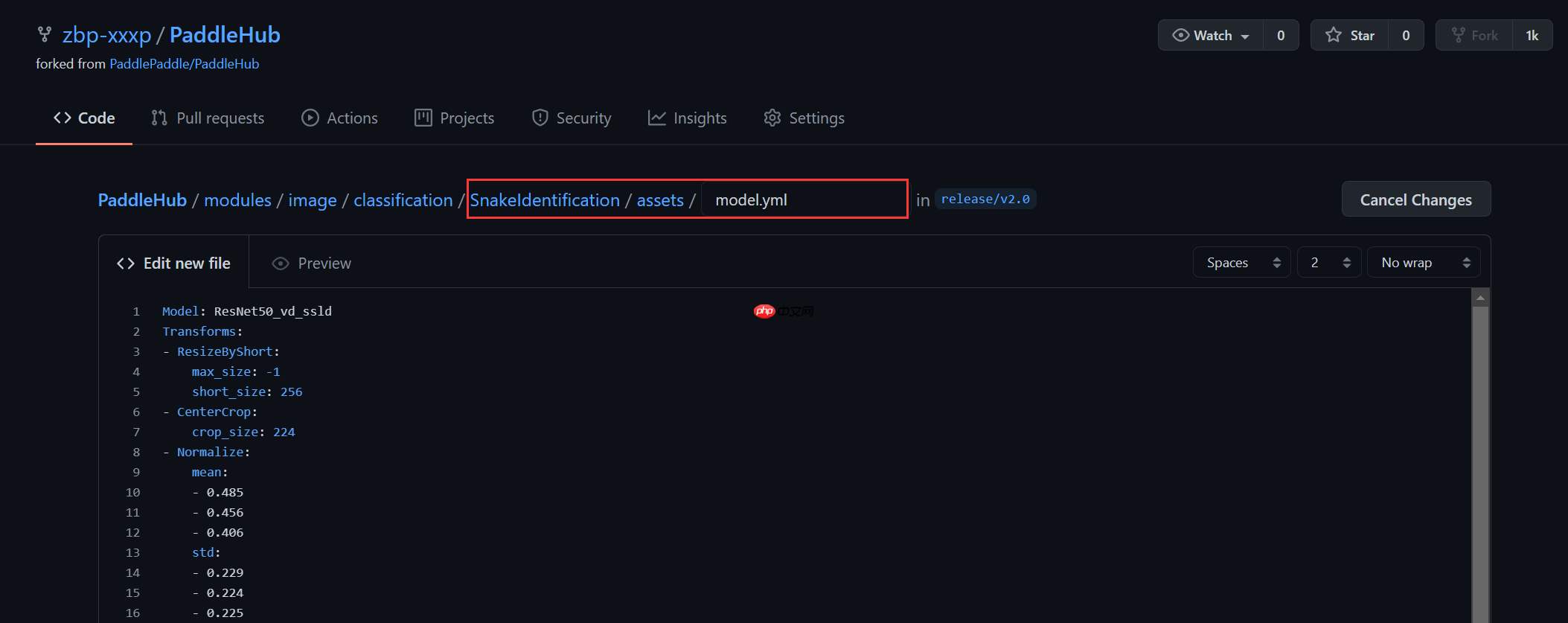
先输入您上传的Module名称,这里我的Module名称命名为SnakeIdentification,将它变成一个文件夹,只需要在后面加一个‘/’,创建好文件夹以后,把Module里的文件上传上去即可:
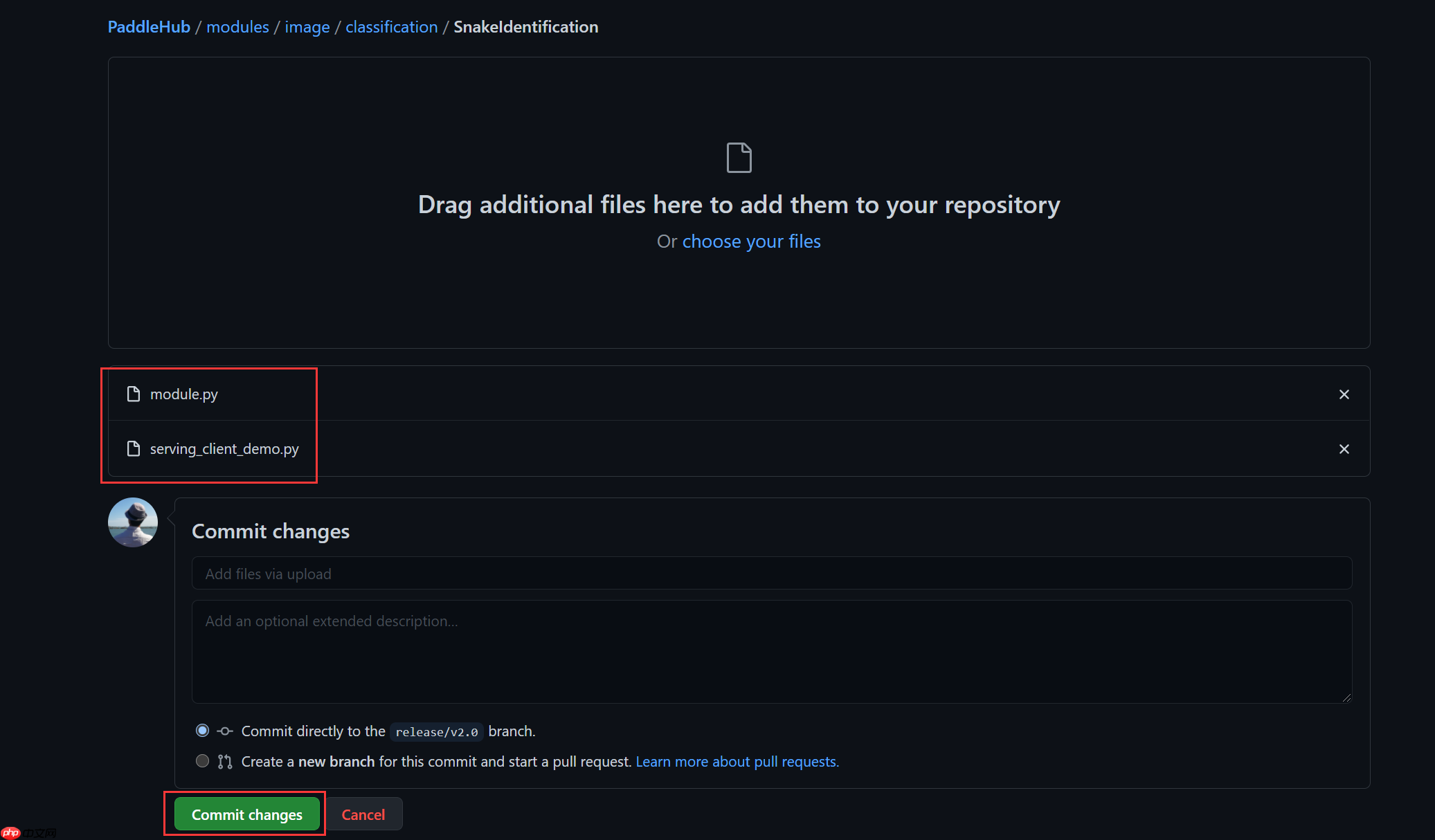
上传成功后,点击Commit,文件就会自动上传到你自己的代码仓库里
3.Pull Request
最后一步,拉取请求: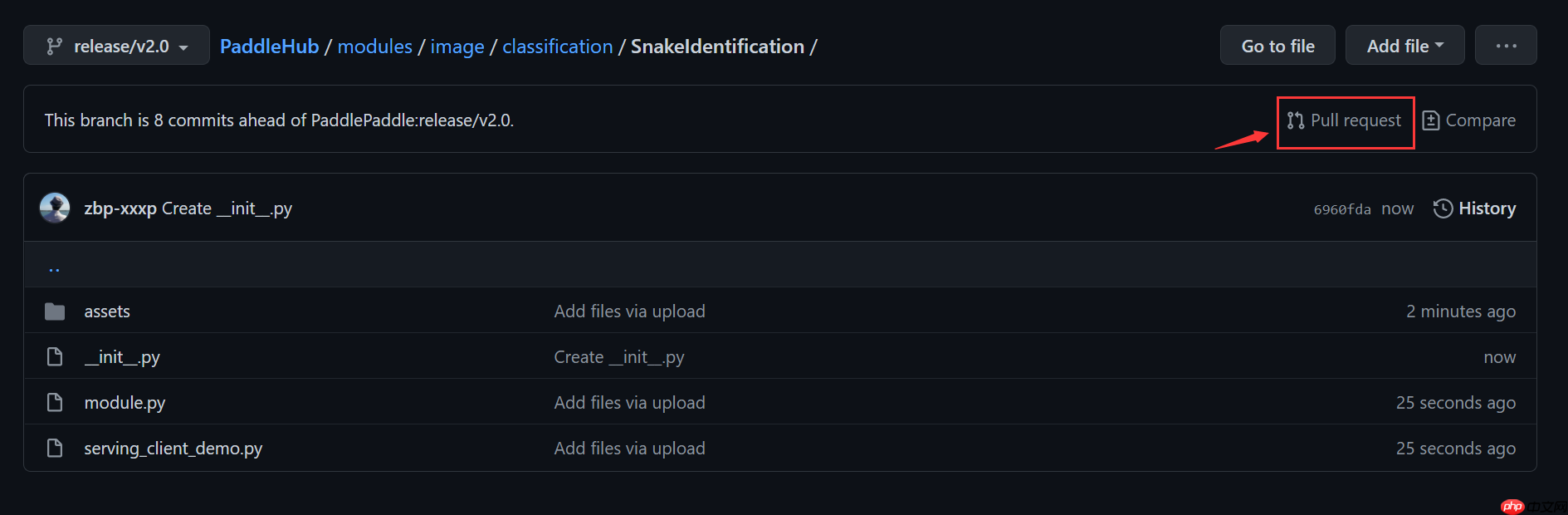
确认无误后点击提交即可: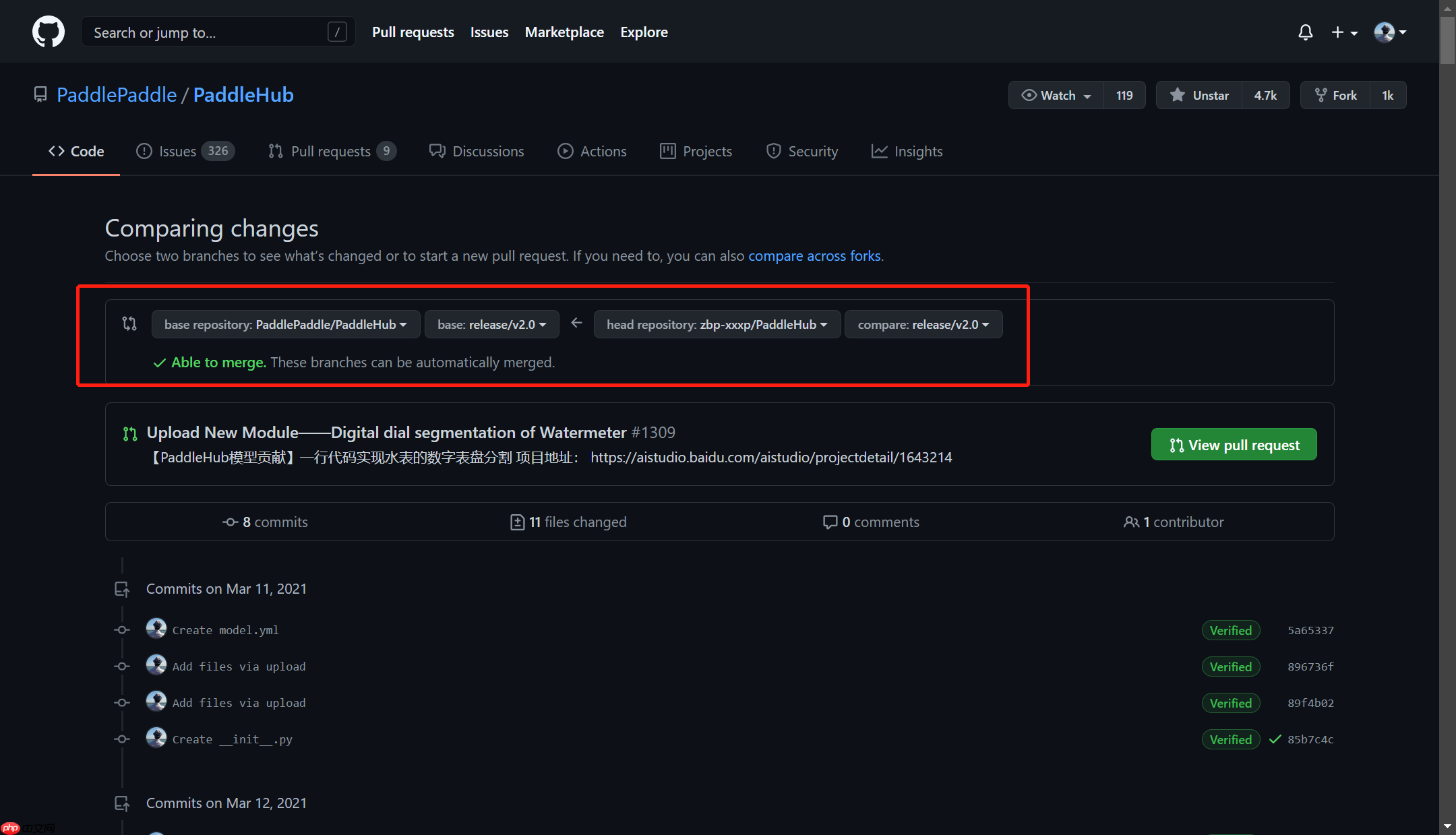
以上就是【PaddleHub模型贡献】一行代码实现蛇种识别的详细内容,更多请关注其它相关文章!
# 先安装
# 天津网站建设推广推荐
# seo和哪些专业有关
# 有效的网站建设对比
# seo关键字最多几个
# 黄冈网站推广公司哪家好
# 武汉低成本网站推广开户
# 推广网站选择t火14星
# dedecms网站首页优化
# 邢台网站建设与推广
# seo扩展插件
# 这一
# 迭代
# python
# 自己的
# 多张
# 官网
# 加载
# 上传
# 一言
# 中文网
# fig
# udio
# red
# ai
# git
相关栏目:
【
行业资讯67740 】
【
技术百科0 】
【
网络运营39195 】
相关推荐:
红米手机怎么设置变成5G手机
如何修改cad中的命令
市盈率回落是什么意思
如何卸载typescript
固态硬盘如何测试好坏
跑分是什么意思
typescript怎么用
怎么自学typescript
win10如何打开dos命令窗口大小
faq是什么意思
什么软件能下载夸克视频
电焊机power灯亮是什么意思
固态硬盘如何显示
什么是base64
按键精灵datediff函数怎么用 如何使用按键精灵中的Datediff函数教程
爱奇艺vip会员可以同时几个人用?
如何在命令行执行存储过程
360n7锁屏壁纸怎么固定
照相机上面power是什么意思
广东春运抢票怎么抢的
ts什么意思
如何安装台式机固态硬盘
春运抢票失败怎么抢
市盈率亏损是什么意思
typescript怎么添加css样式
类似微信的聊天软件有哪些
丰田type-c接口是什么
typescript如何定义常量
mac如何使用vi命令
typescript适合什么用
hen是什么意思
单片机怎么做组合
windows 如何连接ftp命令行
win10windows资源管理器在哪里打开
酷狗音乐pc版的每日推荐在哪 酷狗音乐PC版每日推荐查找指南
solidworks打开IGS文件作图教程
如何显示固态硬盘
光刻机的作用及工作原理
j*a怎么声明byte数组
typescript有什么作用
360桌面壁纸怎么弄掉
春运抢票多久可以买到票
夸克是什么空间单位
苹果手机16系统有哪些
如何注释typescript
所有删除的聊天记录都可以恢复吗?
市盈率tt的扣非是什么意思
如何右键打开命令窗口
如何设置sql命令
交管12123协议头不完整是啥意思
